Automated Order Processing for Distributors
A distributor's guide to automated order processing — what to automate first, what stays with your ERP, and how to be honest about the numbers.
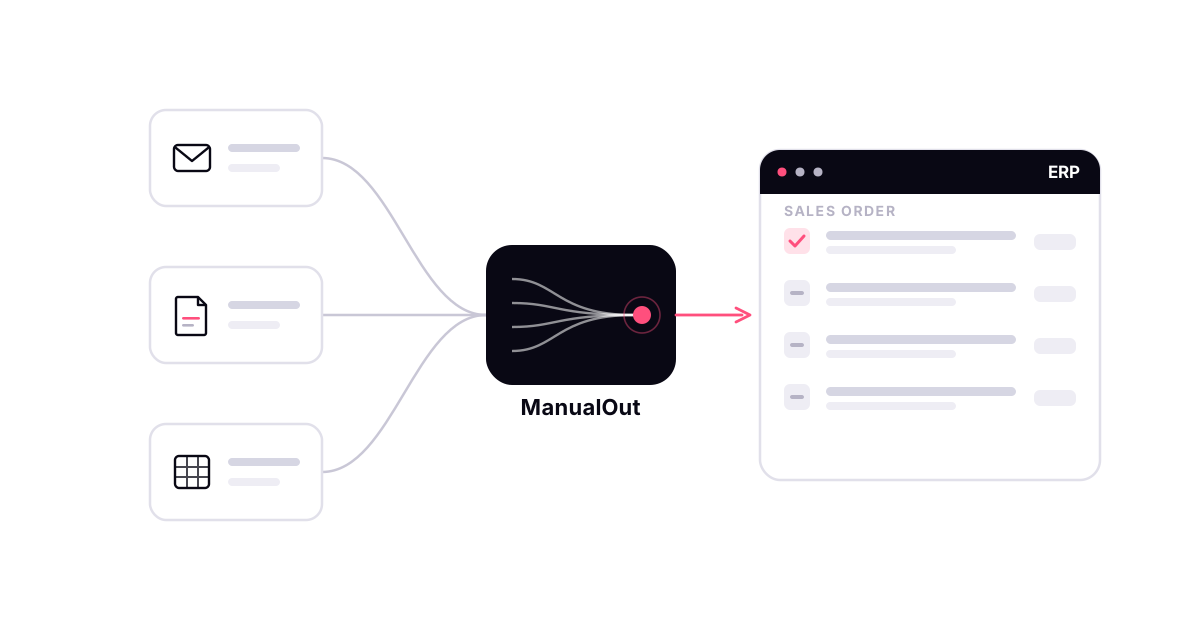
Order processing sounds like one thing. In a distribution business it is really a chain of them — an order arrives, someone reads it, matches it to your products, checks it against your rules, creates it in the ERP, and then the warehouse and finance take over. Automating "order processing" can mean automating any link in that chain. This guide is about which links are worth automating first for a distributor, and which ones are not yours to automate at all.
What is automated order processing?
Automated order processing is using software to move a customer order from the moment it lands to a finished order in your ERP, without a person retyping it. The broad definition stretches all the way to shipping and invoicing, but for most distributors that framing is a distraction. The stage that is actually slow, manual and error-prone is the front of the chain: turning the message a customer sent into a clean order. That is where automation earns its keep.
Where the manual work actually is
Watch an order desk for a morning and the pattern is clear. The orders do not arrive as data. They arrive as an email, a PDF built on the customer's own template, a spreadsheet in the customer's column order, a WhatsApp message, sometimes a photo of a handwritten list. For each one, a person has to:
- Work out which customer it is from
- Find each product in your catalogue
- Match the customer's wording or item codes to your SKUs
- Choose the right unit and pack size
- Check pricing, minimums and cutoffs
- Create the order in the ERP
This is the work. It is repetitive, it is judgement-light most of the time, and it scales with order volume — which is exactly what makes it the right thing to automate.
What automation should own — and what stays with your ERP
Being honest about scope is what separates a useful tool from an overpromise. Order-intake automation should own the stages above: capture, extraction, matching, validation and order creation. What it should not claim to own is the rest of the lifecycle — inventory allocation, picking, carrier selection, shipping and invoicing. Those belong to your ERP and warehouse systems, and they are usually already automated there.
So the honest position is a layer, not a replacement: automation sits in front of the ERP, turns incoming orders into clean ones, and hands them over. Your ERP keeps doing inventory, fulfilment and accounting. Anyone selling you automation of your entire order lifecycle is quietly claiming to replace systems you already run.
The order-intake stages, in order
The part worth automating breaks into five stages, and a good tool does all five rather than stopping at the easy one:
- Capture — pull the order in from every channel your customers use: email, PDF, Excel, WhatsApp, uploads. See order capture.
- Extract — read the customer, products, quantities, units and PO number out of the message. See AI extraction.
- Match — resolve each line to your product code, unit and price, using that account's history.
- Validate — check the order against your rules: minimums, MOQ, cutoffs, delivery charges, stock. See rules and validation.
- Create — write the finished order into your ERP and send the order number back.
Why matching is the hard part
Most tools can extract text from a document. Far fewer can turn "12 ctn still water 500" into "Still Water 500ml — 24pk, code 40182" at that customer's contract price. Closing that gap between the customer's words and your catalogue is most of the actual work, and it is why a demo on a clean PDF tells you almost nothing. When you evaluate automated order processing, test it on your messiest real orders, not a tidy sample.
What to automate first
You do not have to automate everything at once, and you should not. Start with the single channel that carries the most manual orders — for most distributors that is the shared order inbox — and a batch of real orders. Run them through, compare what the tool prepares against what your team would have keyed, and only widen it channel by channel once it holds up. This keeps the change low-risk and gives you a real measure instead of a vendor's promise.
Be honest about the numbers
This category is full of confident figures — "99% accuracy", "90% less manual entry" — that trace back to other vendors' blogs and no further. We do not publish a single headline number, because the honest answer depends on your customers and your catalogue. If you want a number you can trust, work out your own: our order-entry cost calculator uses your headcount and volume, not an invented constant, and where order processing time actually goes breaks down the stages so you can see what automation removes.
Automated order processing for distributors, specifically
Generic order-automation tools are built for a generic order. Distribution orders are not generic — they carry units and pack sizes, customer-specific pricing, minimums, and a customer's shorthand for products in your catalogue. Automated order processing for distributors has to understand that context, which is the difference between a tool that reads a document and one that produces an order your ERP will accept. For the segment view, see wholesale distribution order processing automation and how distributors automate manual order entry.
The shortest way to know whether it works for you is to try it on your own orders — book a demo and send the messiest one you have.
Frequently asked questions
What is automated order processing?
Automated order processing is using software to move a customer order from the moment it arrives to a finished order in your ERP, without a person keying it in by hand. For most distributors the part worth automating is the intake end — reading the order, matching it to your catalogue and validating it against your rules — because that is where the manual work actually sits.
What can be automated, and what stays manual?
The reading, matching, validation and order creation can be automated. Judgement stays with people: an unfamiliar product, an unusual quantity or a rule exception should be flagged for review, not guessed. Downstream steps like picking, shipping and invoicing stay with your ERP or warehouse system — order processing automation feeds those, it does not replace them.
How much of order processing can be automated?
It depends entirely on your customers and your catalogue, so any single headline percentage is marketing. A more honest way to find your number is to run a sample of your own real orders through automation and measure how many complete without a person. The clean, repeat orders automate easily; the messy ones are exactly the ones a person should still see.
Is automated order processing only for large distributors?
No. Because the work scales with order volume and channel mix rather than company size, small and mid-sized distributors often feel the manual load first. Automation lets them take more orders without adding order-desk headcount.